Visibility
Use the commands in the Visibility menu, Visibility toolbar and Element-Display toolbar to show or hide:
•MD-Solids and CAD-Solids
•sketch-elements in Parts
•specific element-types
You can also dock or float MotionDesigner.
Visibility menu (new in MD17)
When you show menus, the Visibility menu is at the top.
The Visibility menu combines (most of) the commands in the Visibility toolbar and the Element-Display toolbar.

Visibility menu - MD17
Toolbars
Visibility toolbar
When you show toolbars, the Visibility toolbar is above the graphics-area.
Toggle the icons in the toolbar to show or hide kinematic and solid element-types.
You can also dock or float MotionDesigner.
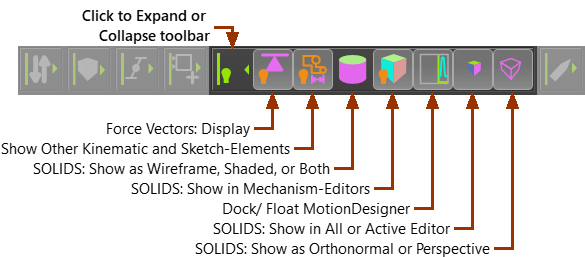
Notes:
SOLIDS - toggle buttons that control how to display MD-Solids and CAD-Solids. Force Vectors: Display is in the Forces menu. View as Orthonormal or Perspective is in the View menu. |
Element-Display toolbar
These commands are in the Visibility menu.
When you show toolbars, the Element-Display toolbar is BELOW the graphics-area.
Toggle the icons in the toolbar to show or hide different element-types
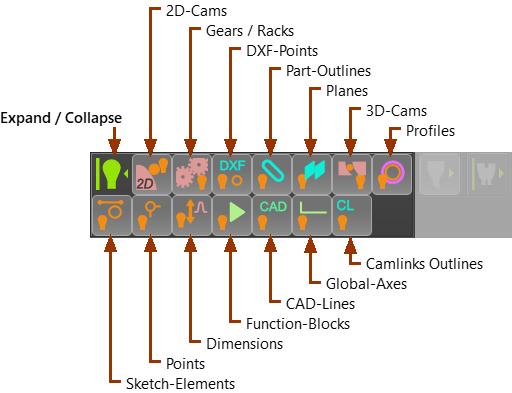
Display Filters toolbar
[Default: All Filters Selected to Display ALL element-types]