Run
Use the commands in the Run menu and toolbar to run (cycle), or pause your kinematics* model, or to step forwards or backwards through the machine-cycle, or to reset the machine-angle and Revs - Number of complete machine-cycles, (Revolutions) o to zero.
* To run the Dynamics model you must use Dynamics menu (or toolbar) > Run Dynamics.
Run menu
When you show menus, the Run menu is at the top.

MD17 - Run menu
Run toolbar
When you show toolbars, the Run toolbar is ABOVE the graphics-area.
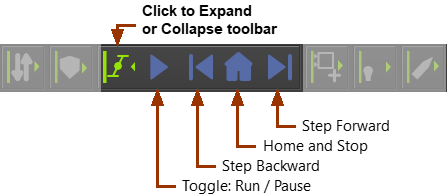
Run toolbar
Run menu: Commands and shortcuts
Icon |
Command |
Shortcut |
|---|---|---|
|
Toggle: Run / Pause Toggle on to continuously cycle the model at a constant-rate - see Machine-Settings > Cycle/Minute Toggle off to pause the model at the Master Machine-Angle (MMA). |
ALT+C |
|
Step Forward Click to increase the MMA by 360 / Number-of-Steps |
CTRL+ALT+F |
|
Step Backward Click o decrease the MMA by 360/ Number-of-Steps |
ALT+B |
|
Home (Reset) Click to move the MMA and Revs - Number of complete machine-cycles, (Revolutions) to Zero, and to stop the model. |
“Home” key on your keyboard |
To edit the MMA, approximately or exactly, see Master-Machine-Angle (MMA). |
||


