Force-Data FB
See: Add Force-Data FB , Configure Power Source
Use the Force-Data FB to measure/analyze the Force* that acts ON a Point and Part at a Joint, a Spring, the contact between a 2D-Cam and Follower-Profile, or the contact between gear-teeth in a Gear-Pair.
To use the Force-Data FB, you should also use Configure the Power Source to make sure the correct element is the power-source for each kinematic-chain in your model.
* Force or Torque

After you add a Force-Data FB, you must open the Force-Data dialog to select Force element. To open the Force-Data dialog :
The Force-Data dialog is now open. |
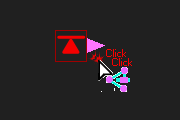
Force-Data dialog
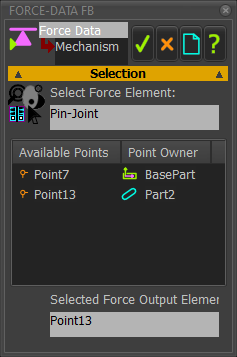 Force-Data dialog |
Selection STEP 1.Select a Force Element: A Force-element is a Joint, Cam, Gear, Rack, Ball-screw or a Spring
The Force element should now be in the Select Force Element box <<< in the image: Pin-Joint is the Force element In the box below: A list of Available Points, each with a Point Owner Each Available Point is a child to the Force element (see STEP 1) STEP 2.Select a Point:
A Point should now be in the Selected Force Output Elements box at the bottom of the dialog. The output from the Force Data FB is the Force* that ACTS ON the Point that you select as the Force element. |
||
List of AVAILABLE-POINTS for each type of Force element
|
|||