MD-Solid
The commands in the MD-Solids menu and MD-Solids toolbar relate to MD-Solids only.
Terminology and Definitions
Solids : |
General name for MD-Solids and CAD-Solids. |
MD-Solids : |
Those Solids that we extrude from a sketch-loop in a Part when you do Add Profile or Add Auto-Profile. |
Sketch-Loop : |
A series of sketch-elements, that you join end to end to form a closed loop. See examples: sketch-loop. |
Profile : |
When you do Add Profile, we add two offset contours as copies of the sketch-loop you select. The Profile contours are offset by different distances from the Mechanism-Plane. |
Auto-profile : |
A Profile that we add to a quasi sketch-loop (that we also add) when you do Add Auto-Profile. |
Quasi Sketch-Loop : |
A sketch-loop with limited options, to which we add Auto-Profiles, that we add to a Part when you do Add Auto-Profile. |
extrusion : |
The Solid between the two offset contours of the Profile. |
CAD-Solids : |
Those Solid models that you import from CAD onto a CAD-Line - see CAD-Line dialog. |
To see MD-Solids and CAD-Solids, you must enable Visibility toolbar > Show Solids in Mechanisms
MD-Solids menu
When you show menus, the MD-Solids menu is at the top.

Solids menu (MD17)
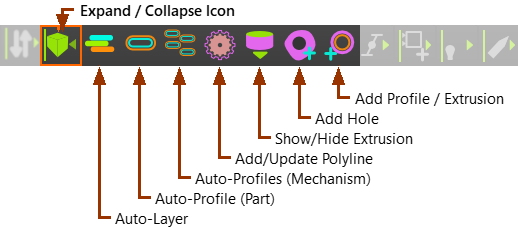
MD-Solids toolbar
When you show toolbars, the MD-Solids toolbar is above the graphics-area