About Add Polyline
You can add a Polyline to a 2D-Cam or Gear-Pair, only.
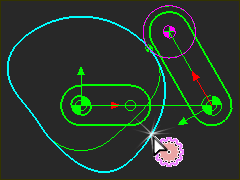
A Polyline is a sketch-element that is a copy of the shape of a 2D-Cam or Gear-Pair.
When the 2D-Cam or Gear-Pair is a “closed” shape, the Polyline is a closed sketch-loop*.
When a 2D-Cam is open or the Gear-Pair are gear-segments the Polyline is an “open” shape. You must add sketch-elements to complete a closed shape and sketch-loop.
You can add Profile/Extrusions to the closed sketch-loop to show 2D-Cams and Gear-Pairs as MD-Solids.
Update Polyline
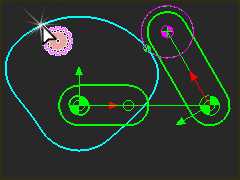
The shape of the Polyline does not update if you edit a parameter that changes the shape of a 2D-Cam or Gear-Pair. Therefore, the shape of the Profile will not update, also.
You must update the shape of the Polyline manually, by adding the Polyline to the 2D-Cam or Gear-Pair again - see Update Polyline
To delete a Polyline
You must delete the 2D-Cam or Gear-Pair before you can delete the Polyline.
Note:
We do not recommend that you add a Polyline to a 2D-Cam or Gear-Pair, unless the model is near to complete. It is a complex element that will increase the time to add and edit other elements. |
Add Polyline
STEP 1: Put the MMA to Zero degrees
|
||
STEP 2:Start the Add Polyline command:
The Command-Manager has one selection-box. |
||
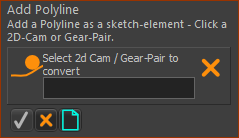 Command-Manager |
||
STEP 3:Select a 2D-Cam or Gear-Pair To add a Polyline to a 2D-Cam or Gear-Pair:
|
||
The 2D-Cam or Gear-Pair is in the Command-Manager selection-box. 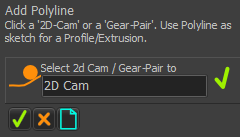 2D-Cam element in the Selection-Box |
||
STEP 4: Complete the command
The Polyline is now a sketch-element in the Part that is a copy of the shape of the 2D-Cam or Gear-Pair. |


Update Polyline
To Update the shape of the Polyline to the new shape of a 2D-Cam or Gear-Pair:
STEP 1: Put the MMA to Zero degrees
|
|||
STEP 2:Start the Add Polyline command:
The Command-Manager has one selection-box. |
|||
Command-Manager |
|||
STEP 3:Select the 2D-Cam or Gear-Pair whose shape you want to update
|
|||
STEP 4: Complete the command
The shape of the Polyline updates to the new shape of the 2D-Cam or Gear-Pair. |