Import SOLIDWORKS Sketch FB
See also : Add Import SOLIDWORKS Sketch FB
See also: CAD-Line > DXF tab
Use the Import SOLIDWORKS sketch FB to import sketches from a SOLIDWORKS document.
Limitations of this tool:
•Can import Lines and Arcs
•Cannot import Blocks, Parabolas, Ellipses, ...
•Maximum number of sketch-elements is approximately 50
•Construction and center-lines import as Lines
•Cannot import Constraints
•Start-Points and End-Points of Lines and Arcs are “locked” after you import them. To unlock Points , see Point Properties dialog.

 Import SOLIDWORKS Sketch FB in PART-EDITOR |
You add an “Import SOLIDWORKS sketch FB” as a child to a Part, in the Part-Editor.
|
|
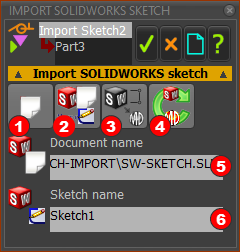
The Import SolidWorks Sketch dialog is now open. |
||
Import SolidWorks Sketch dialog
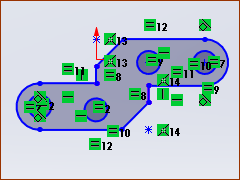 Active sketch in SOLIDWORKS |
STEP 1: In SOLIDWORKS
The image is an active sketch in SOLIDWORKS.
|
|
 Import SolidWorks sketch dialog 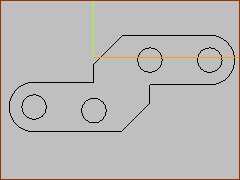 Sketch imported to MechDesigner |
STEP 2.Import the active sketch from SOLIDWORKS In the Import SolidWorks sketch dialog:
This image shows the sketch-elements in MechDesigner. |


 is colorized.
