Kinematic elements
Kinematic elements are coplanar with the XY-Plane of the active Mechanism-Editor*.
Kinematic elements symbolically represent the moving parts in your machine. You join Parts to each other to build kinematic-chains (mechanisms, linkages).
Kinematic elements are NOT solid bodies and they do NOT have shape or form**.
* The exception is a Part that has a Ball-Joint at its start-Point and end-Point.
** To add a solid body to a Part, you must add a Profile to a Part, and/or import a SolidWorks part/assembly document, or import an STL file from other CAD.
Mechanism menu > Kinematic elements

Mechanisim menu > Kinematic-elements (MD17)
When you show menus, the commands to add Kinematic elements are in the Mechanism menu.
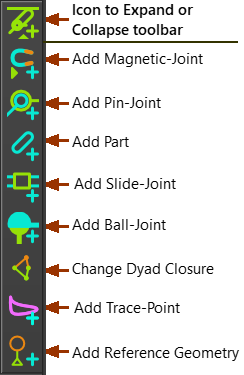
Kinematics elements toolbar
When you show toolbars, the Kinematic elements toolbar is to the left of the graphics-area.