Rename
About
You can rename all elements
After you rename an element, the element-icon identifies the element-type.
In the Selection-Window and Assembly-Tree, the element-icon is to the left of the element-name.
To Rename an element:
There are three(3) methods to rename an element:

Use the Rename Element dialog if you can select the element in the graphics-area or the Element-Explorer. |
|||
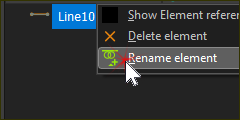 Selection-Window: shortcut menu |
STEP 1:Open the Rename Element dialog:
The Rename Element dialog is now open. STEP 2:Enter a “New Name” to replace the “Old Name”:
|
||
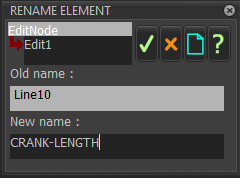 RENAME ELEMENT dialog |
|||

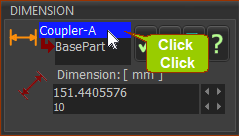 Rename element: |
Use this method when the element has a dialog and the dialog is open:
Unfortunately, not all element-types have a dialog with which to rename the element. Refer to Method 1. |

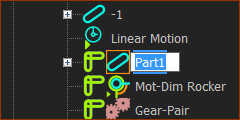 Rename element: |
Do the Windows® method:
Unfortunately, not all element-types show in the Assembly-Tree or Selection-Window. Refer to Method 1. |