Blend-Point Editor: Y-axis Values
It is important to know that the Blend-Point of each motion-derivative has two Y-axis motion-values
 . The two motion-values can be equal or different.
The Blend-Point of each motion-derivative has a motion-value at the:
•End of the Previous-Segment
AND at the:
•Start of the Selected-Segment
Because there are four motion-derivatives, there are eight (8) motion-values at each Blend-Point.
Example
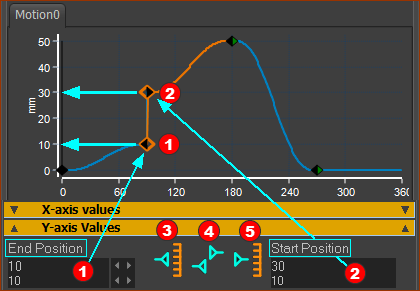
Position graph, Position motion-values, Position Control-Buttons
The image above shows the:
•Position motion-graph
•Y-axis motion-values of Position in the motion-plot and in the data-boxes
•Three Control-Buttons 

 for the Position motion-derivative
The image does not show the:
•Velocity, Acceleration, and Jerk motion-graphs
•Velocity, Acceleration, and Jerk motion-values and data-boxes
•Velocity, Acceleration, and Jerk Control-Buttons
Y-axis Values
Position Motion-Graph
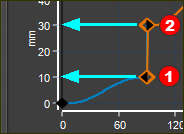 Position motion-graph |
The motion-graph of Position shows that the Blend-Point has two motion-values |
Position Motion-Values
 |
|
The Y-axis motion-values for the Position motion-derivative are:
Reminder 1: There are two motion-values and two data-boxes for each motion-derivative (P,V,A,J) to give 8 motion-values in total. Reminder 2: The Control-Buttons, the Motion-Law, and the motion-derivative determine the read-write or read-only status of each motion-value. |

Position Control Buttons
See more at Control Buttons: States and Patterns
 |
|
The Control-Buttons for the Position motion-derivative allows you to edit the two motion-values.
|