Why is my dimension negative?
There is a –ve sign if the distance to a sketch-element is in a negative direction of the Y-axis of the sketch-element you measure from.
In practice, do not delete the – sign, but edit the dimension in the normal way. |
Further explanation of the negative dimension
Each Line has an X-Y coordinate-system. •The 0,0 origin is at the start-Point of the Line •+ X-axis is from its start-Point(1) to its end-Point(2) •+ Y-axis is at +90º from the X-axis, and on the Mechanism-Plane. |
|
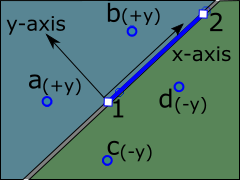 |
When you add a dimension that is a perpendicular distance from a Line, (Points 1 to 2) the dimension is from the X-axis of the Line, with the Y-axis =0. To measure from the X-axis (solid Blue line) to: •Point a, the dimension is +ve because 'a' is in the +Y-axis direction •Point b, the dimension is +ve because the 'b' is in the +Y-axis direction •Point c, the dimension is –ve because the 'c' is in the +Y-axis direction •Point d, the dimension is –ve because 'd' is in the –Y-axis direction |
The Y-axis is a 'pseudo-Line'. It also has a coordinate system. The X-axis of the Y-axis is the Y-axis !!! |
|
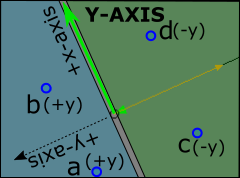 |
To measure from the Y-axis (solid Green line) to: •Point a, the dimension is +ve because 'a' is in the +Y-axis direction •Point b, the dimension is +ve because the 'b' is in the +Y-axis direction •Point c, the dimension is –ve because the 'c' is in the +Y-axis direction •Point d, the dimension is –ve because 'd' is in the –Y-axis direction |