 Model-Editor
What is the Model-Editor?
The Model-Editor shows the Solid and Plane elements in your model. You can cycle the model continuously or move it to any machine angle. In the Model-Editor, you can: •add Planes which will be offset from other Planes •add Mechanisms* to Planes •edit Solid elements •you can cycle the model continuously or move it to any machine angle (from 0 to 360º). * You must use the Model-Editor to add a minimum of one Mechanism to a Plane. |
Model-Editor workspace
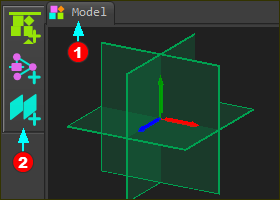 Model-Editor: Reference Triad and fixed Planes |
||
Graphics-area :
Name-tab
|

Menu and Toolbar
Menu - the two commands that you can use in the Model-Editor are in the Mechanism menu Toolbar - the commands that you can use in the Model-Editor are in the Model elements toolbar. |
See also: