How do I know I am using the Part-Editor and not the Mechanism-Editor?
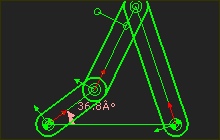 Part in Mechanism-Editor |
Mechanism-Editor: •The name tab provides the name of the Mechanism element. •Part-Outline are around each Part. •The XY-axes at the start-Point of the Parts are small •Usually, there are Function-Blocks in the graphics-area Part-Editor: •The name tab provides the name of the Part element. •The XY-axes are large. •You cannot see Part-Outlines of any of the Parts in the model. Sketch-Elements and Dimensions •A Dimension controls the length of the CAD-Line between the start-Point and end-Point of the Part. |
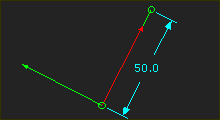 Part in Part-Editor |