Elements
When you run many commands, you add an element to the graphics-area and the Assembly-Tree.
Elements in the Assembly-Tree
The Assembly-Tree compiles the elements into a hierarchical and chronological list.
•Element-Name + number
Each element has a unique name and number.
The first element of each type that you add to the model does not have a number. When you add more elements of the same type, a number is the last character of the element's name.
E.g. As you add Parts, the names of the elements in the Assembly-Tree are Part, Part2, Part3, .... .
You can rename all elements - see rename elements
•Element Icon
There is an icon to the left of the element-name.
Each icon is the symbol for the element.
You cannot change the icon.
Example Assembly-Tree
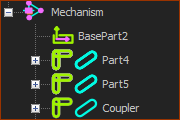 Example Assemble-Tree |
The element-names in the Assembly-Tree are: Part4, Part5, and Coupler. You can see that the Coupler element is a Part because the icon to its left identifies it as a Part element. Hence, one Part element has been renamed to Coupler. Note: The Assembly-Tree also indicates the kinematic-state of each Part The kinematic-state (kinematically-defined or not) of each Part is important. |