Objectives
To explain •the concept of a dyad, a dyad-closure, and how to change the dyad-closure. •how dyads can break! •that when a kinematic-chain is kinematically-defined before you add a dyad, it is also kinematically-defined after you add a dyad. A dyad is also called an Assur Group in some kinematic journals. |
What is a Dyad:
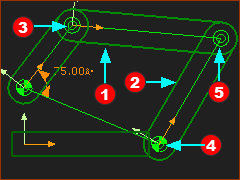 5 elements in the R-R-R dyad |
A dyad is ALWAYS: 2 × Parts + 3 × Joints |
In the image, there is a Rocker as a Motion-Part, and five elements in the dyad. The 5 elements in the dyad are: 2 × Parts ( + 3 × Pin-Joints ( This dyad is one of 5 Planar dyads. We model different dyads later in the tutorials. |


 ,
, 
Dyad: Degrees-of-Freedom and Mobility.
A dyad does not change the degrees-of-freedom of a kinematic-chain. A Part on a Plane that is free of joints has three degrees-of-freedom (DOF). A dyad has two Parts. Therefore: + 3 DOF × 2 Parts = + 6 DOF. Each Joint between two Parts removes two degrees-of-freedom (DOF): A dyad has three Joints. Therefore: – 2 DOF × 3 Joints = – 6 DOF Therefore, a dyad does not change the degrees-of-freedoms. of a kinematic-chain. Therefore, we can see that if a kinematic-chain is kinematically-defined, or solved, before you add a dyad, then it is also solved after you add a dyad. |
R-R-R dyad and the KINEMATICS-TREE
Explore the Kinematics-Tree:
|
||||
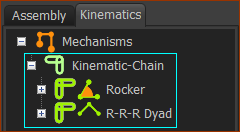 Kinematic-Chain |
Explore the Kinematic-Chain
You can see the Rocker and the R-R-R dyad. Elements in the Rocker - the Motion-Part.
Elements in the R-R-R dyad:
Question: Why R-R-R? Answer: The standard kinematic-term for a Pin-Joint is a Revolute-Joint. Therefore, the letter R in the dyad is for Revolute. Therefore, the R-R-R dyad is identical to a dyad with three Pin-Joints. The R-R-R dyad is one of 5 Planar dyads. We model different dyads later in the tutorials. |
|||
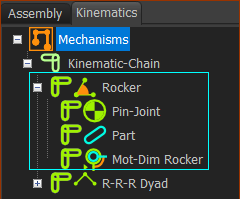 Rocker in the Kinematic-Tree |
||||
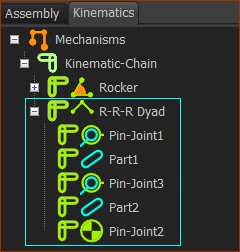 R-R-R dyad in the Kinematic-Tree |
||||

Dyad-Closures
Usually, you can change how you assemble the two Parts in a dyad. Each assembly of a dyad is called a dyad-closure. When you add the last joint in a dyad, we assemble the Parts for you in one of the dyad-closures. If the dyad-closure is not the dyad-closure you want, you must use the Change Dyad-Closure tool - see How to Change the Dyad Closure, below. |
|
|
The white Part-Outlines are the two Parts in the dyad: Part 1 and Part 2. J1, J2, and J3 are the three Pin-Joints. Part 1, and J1 •The position of J1 is fixed at the end of the Rocker. •Before you add J3, Part 1 can rotate freely about J1. •J3 must be on the CYAN ARC Part 2, and J2 •The position of J2 is fixed in the Base-Part. •Before you add J3, Part 2 can rotate freely about J2. •J3 must be on the PINK ARC When we add J3: J3 can only on the CYAN ARC and the PINK ARC. The CYAN ARC intersects the PINK ARC at two places. J3 can only be in one of two places. Therefore, the R-R-R dyad has two Dyad-Closures. |
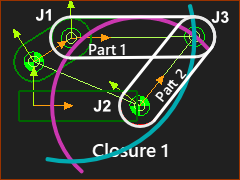
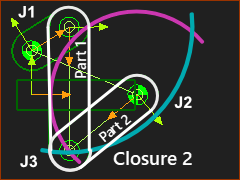
How to Change the Dyad-Closure
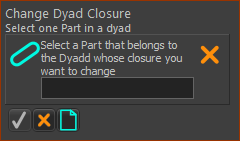
When you add the last of the three Joints in a dyad, we assemble for you the Parts in one of the dyad-closures. Use Change Dyad-Closure to assemble the Parts in the dyad-closure that you do want |
|||
 |
STEP 1: Start the command
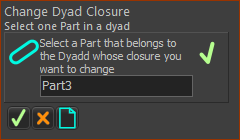
The Command-Manager indicate you must select a Part |
||
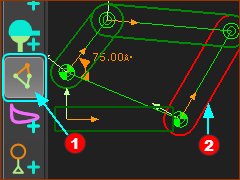 |
STEP 2: Select the Part
STEP 3: Complete the Command
|
||
 |
|||
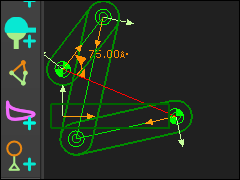 |
The dyad is now assembled in the different dyad-closure. The R-R-R dyad has two closures. To move the dyad to the original dyad-closure, do STEP 1-3 again. |
||


Dyads that can NOT solve - Dyads an break
When you add the last joint in a dyad, it is possible that the dyad cannot build successfully. |
||
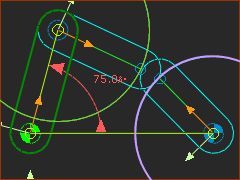 |
In this image, the R-R-R dyad cannot possibly solve when you add the last Pin-Joint. You can see that the two Arcs (that represent where the end-Points of the Parts) cannot intersect. Note: The two Arcs may intersect at a different period of the machine-cycle. E.g. The Motion-Dimension for the Rocker is 75º. If we decrease the angle to 30º, then the dyad can solve. |
|
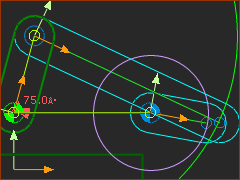 |
In this image, the R-R-R dyad cannot possibly solve when you add the last Pin-Joint. You can see that the two Arcs (that represent where the end-Points of the Parts) cannot intersect. Note: The two Arcs may intersect at a different period of the machine-cycle. E.g. The Motion-Dimension for the Rocker is 75º. If we increase the angle to 100º, then the dyad can solve.
|
|
Dyad Symbols in the Kinematics-Tree
|
||


Kinematics-Tree Symbols
|
Unrestricted Dyad Closure : |
The dyad can solve throughout the machine-cycle. |
|
Restricted Dyad Closure : |
The dyad cannot solve for a period within a machine-cycle, but at a different machine-angle. |
|
Broken dyad : |
The dyad cannot solve now at this machine-angle. |
Extra: Grashof Criterion
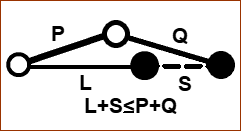 Stretched. |
When the the sum of the shortest and longest bar of a four-bar is less than or equal to the sum of the remaining two bars, then the shortest bar can rotate fully with respect to a neighboring bar. S: length of shortest bar, L: length of the longest bar; P and Q : lengths of the other two bars. Stretched 1.S + L ≤ P + Q Overlapping 2.Q ≤ P + (L – S) 3.P ≤ Q + (L – S) I would recommend you look on-line to study the Grashof Criterion, if this is important to you. In packaging machines, more often than not, the input does not rotate 360. |
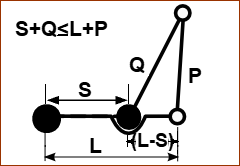 Overlapping |
Video of Tutorial STEP 2.1.A
Rocker + R-R-R dyad - 2 VALID Closures

R-R-R dyad - 2 Valid Closures
Rocker + R-R-R dyad - 2 INVALID Closures (Broken Closures)
R-R-R dyad - 2 Invalid Closures